WinRunner

WinRunner

A Roblox script executor with the look and feel of Windows 95.

WinRunner.exe
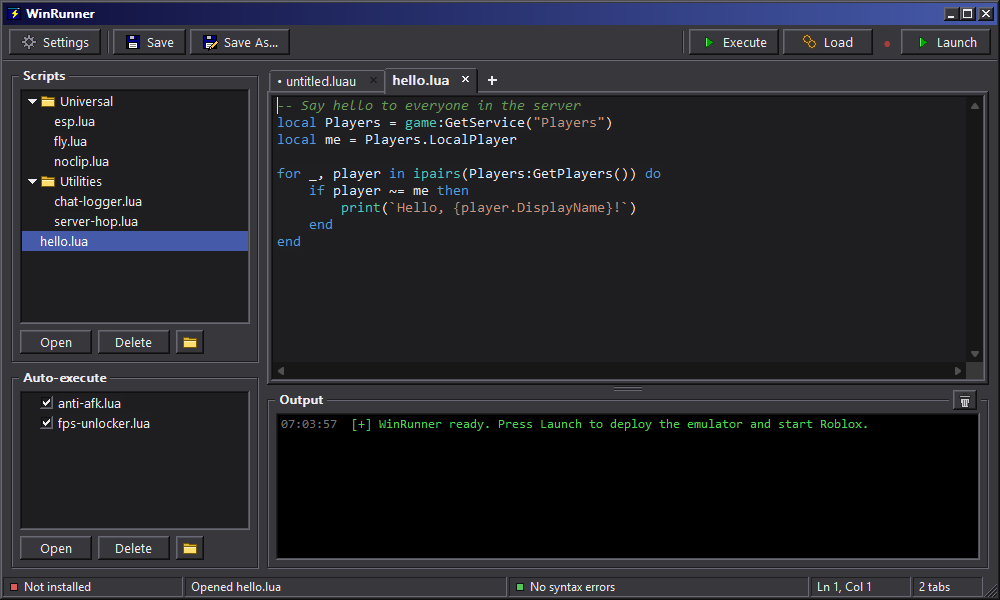
The WinRunner window: script list and Auto-execute on the left, a Luau editor tab and the Output console on the right.
Features
Luau editor

Tabs, syntax highlighting, and a live syntax check that catches mistakes before you press Execute.

Script library

Keep your scripts in folders. Drop files in from Explorer, and the list stays in sync with your scripts folder.

Auto-execute

Drag scripts into Auto-execute and they run every time you join a server. Switch any of them off with a checkbox.

Output console

See script errors and print() output right inside WinRunner.

Automatic updates

WinRunner checks for updates every time it opens and installs them for you.

Your account

Log in once and stay signed in. Redeem keys, check your plan and reset your HWID from the Discord panel.

Getting started
  1. Get a keyPick a plan on the pricing page.
  2. Join the WinRunner DiscordYour account and the download live there.
  3. Create your accountRun /register in the Discord with a username, a password and your key.
  4. Download and log inPress Download on the Discord panel, unzip it, run WinRunner.exe and log in with your username and password. It keeps itself up to date from then on.
WinRunner runs on Windows 10 and 11. Not affiliated with Roblox Corporation.